Claude Code + Codex Plugin: Two AI Brains, One Terminal
How to use OpenAI's Codex plugin inside Claude Code — turning Claude Opus and GPT-5.4 into a dual-brain coding system. Setup, commands, rescue workflows, and when each brain wins.
You’re debugging a gnarly race condition. Claude Code has been going at it for 10 minutes — reading files, forming theories, running tests. Then it hits a wall. Same hypothesis, same failed fix, third attempt.
What if you could call in a second brain — a completely different model with fresh eyes — without leaving your terminal?
That’s what the Codex plugin for Claude Code does. It puts OpenAI’s Codex (powered by GPT-5.4) inside your Claude Code session as a callable rescue agent. Two models. Two reasoning styles. One shared codebase.
What Is It, Exactly?
The Codex plugin is a Claude Code plugin — not a standalone tool. It lives inside your Claude Code session and gives you slash commands to dispatch tasks to OpenAI’s Codex CLI.
Think of it as a second engineer sitting next to you. Claude (Opus) is your primary — it has the full conversation context, knows your project, runs your tools. Codex is your specialist — you hand it a focused task, it works in a sandboxed environment, and returns results.
The key insight: they don’t compete. They complement.
- Claude sees the big picture. It orchestrates, reads files, runs tools, manages state.
- Codex gets a sharp, scoped task. It reasons deeply on that one problem and comes back with an answer.
Setup: 3 Minutes
1. Install the Codex CLI
npm install -g @openai/codex
2. Authenticate
Inside Claude Code, type:
!codex login
This opens a browser for OpenAI authentication. Once done, your token is stored locally.
3. Verify
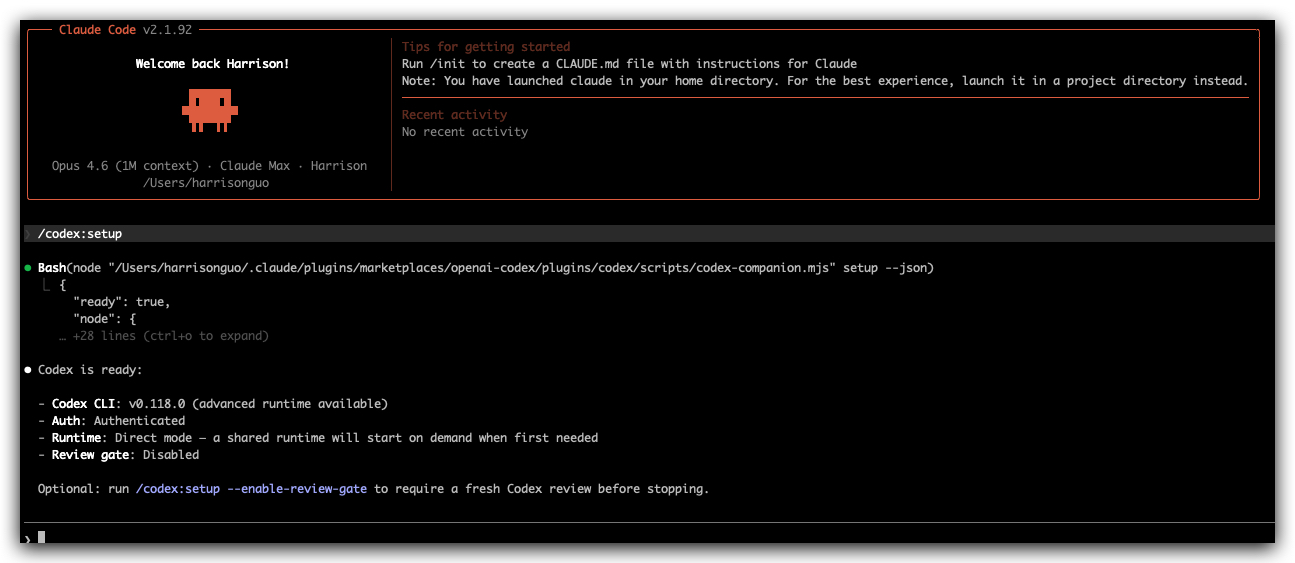
/codex:setup
Claude Code will check that the Codex CLI is installed, authenticated, and ready.
The Commands
The plugin adds 7 slash commands to Claude Code:
| Command | What It Does |
|---|---|
/codex:setup | Check installation and auth status |
/codex:rescue | Hand a task to Codex (the main one you’ll use) |
/codex:review | Run a Codex code review on your local git changes |
/codex:adversarial-review | Same, but Codex actively challenges your design choices |
/codex:status | Check running/recent Codex jobs |
/codex:result | Get the output of a finished background job |
/codex:cancel | Kill an active background Codex job |
The Rescue Workflow: When Claude Gets Stuck
This is where the plugin shines. Claude Code will proactively spawn the Codex rescue agent when it detects it’s stuck — same hypothesis loop, repeated failures, or a task that needs a second implementation pass.
You can also trigger it manually:
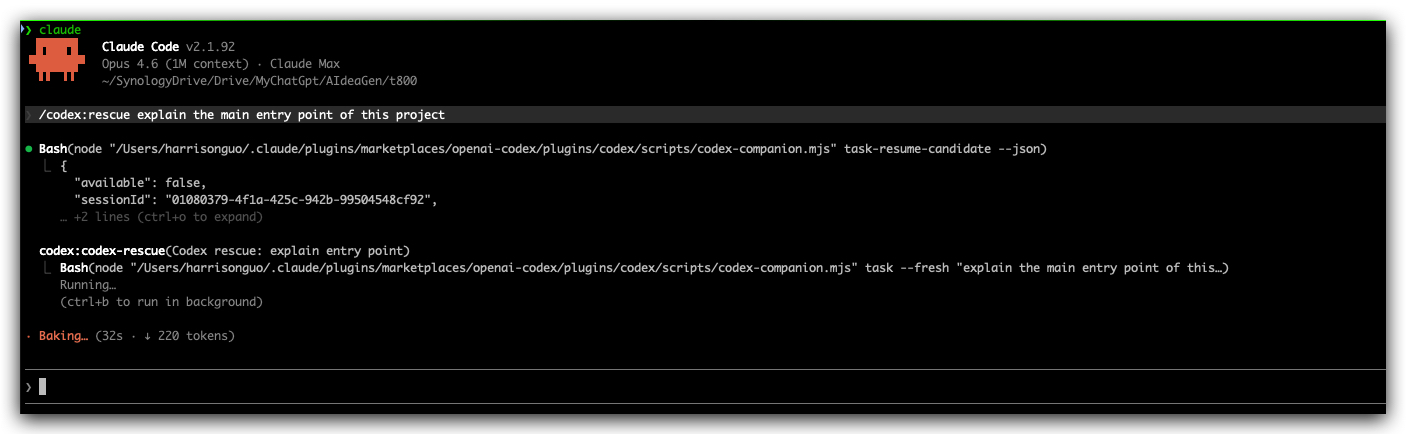
/codex:rescue fix the race condition in src/worker.ts — tests pass locally but fail in CI under parallel execution
What happens behind the scenes:
- Claude takes your request and shapes it into a structured prompt optimized for GPT-5.4
- The plugin invokes
codex-companion.mjs taskwith that prompt - Codex works in the shared repository — reading files, reasoning, writing code
- Results come back into your Claude Code session
Foreground vs Background
Small, focused rescues run in the foreground — you wait and get the result immediately.
Big, multi-step investigations can run in the background:
/codex:rescue --background investigate why the build is 3x slower since the last merge
Check on it later with /codex:status and grab results with /codex:result.
Code Review: A Second Opinion That Actually Pushes Back
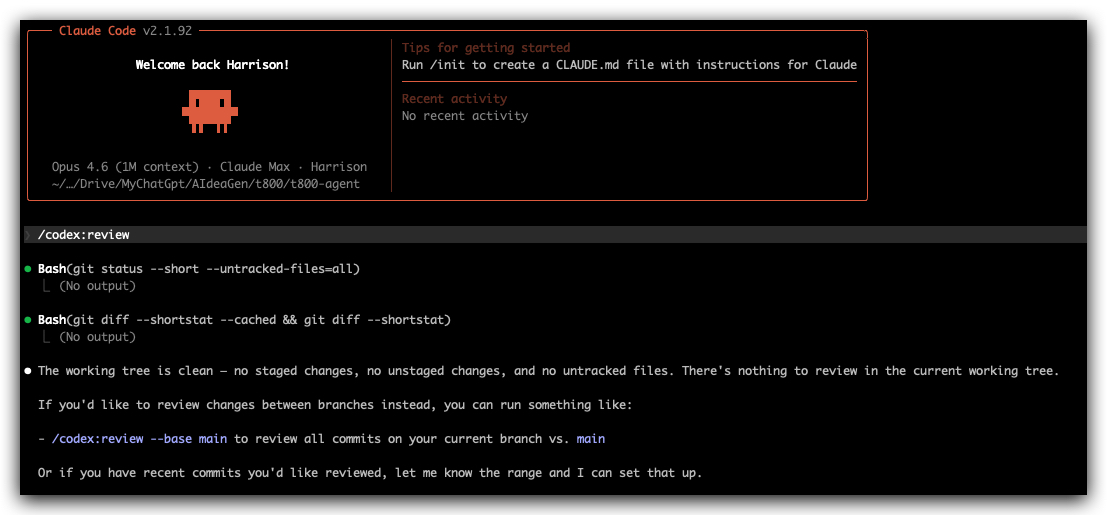
/codex:review
This sends your local git diff to Codex for review. It checks against your working tree or branch changes.
But the real power is the adversarial review:
/codex:adversarial-review
This isn’t “looks good to me.” Codex will actively challenge your implementation approach, question design decisions, and flag things a polite reviewer wouldn’t mention. It’s the code review you need, not the one you want.
When to Use Which Brain
After a month of daily use, here’s my mental model:
Let Claude (Opus) Handle:
- Orchestration — multi-file changes, refactors across the codebase
- Context-heavy tasks — “fix this bug” when you’ve been discussing it for 20 messages
- Tool-heavy workflows — file reads, grep, test runs, build commands
- Conversation continuity — anything that builds on prior context
Call in Codex (GPT-5.4) For:
- Fresh eyes — when Claude is circling the same hypothesis
- Deep single-problem reasoning — “why does this specific test fail under these exact conditions”
- Adversarial review — challenge assumptions Claude might share with you
- Parallel investigation — background a research task while Claude keeps working
The Pattern That Works Best
- Claude does the initial investigation — reads files, forms a theory
- If the theory doesn’t pan out in 2-3 attempts, rescue to Codex with the full context of what was tried
- Codex returns a diagnosis or fix
- Claude applies it in context, runs tests, iterates
Two models. Two reasoning paths. Converging on the same answer faster than either alone.
Advanced: Prompt Shaping
The plugin includes a gpt-5-4-prompting skill that automatically structures your rescue requests into Codex-optimized prompts using XML tags:
<task>— the concrete job<verification_loop>— how to confirm the fix works<grounding_rules>— stay anchored to evidence, not guesses<action_safety>— don’t refactor unrelated code
You don’t need to write these yourself. Claude does it automatically when it hands off to Codex. But knowing they exist explains why Codex rescue results are usually sharper than raw Codex CLI usage.
Advanced: The Review Gate
/codex:setup --enable-review-gate
When enabled, every git commit in the repo triggers an automatic Codex review before the commit completes. It’s a pre-commit hook powered by a second AI brain.
This is aggressive — I only enable it on critical branches or before releases. But when you want zero-trust code quality, it’s unmatched.
The Bottom Line
The Codex plugin doesn’t replace Claude Code. It makes Claude Code anti-fragile.
Every AI agent has blind spots — reasoning loops it can’t escape, patterns it over-fits to, assumptions it shares with its user. A second model with a different training distribution breaks those loops.
The dual-brain setup isn’t about which model is “better.” It’s about coverage. Two independent reasoning paths catch more bugs than one brilliant path run twice.
If you’re using Claude Code daily, install the Codex plugin. It’s 3 minutes of setup and it will save you hours of “why is Claude stuck on this?”
Part of the Claude Code Architecture Deep Dive series. Previous: The 1,421-Line While Loop That Runs Everything.
Comments
This space is waiting for your voice.
Comments will be supported shortly. Stay connected for updates!
This section will display user comments from various platforms like X, Reddit, YouTube, and more. Comments will be curated for quality and relevance.
Have questions? Reach out through:
Want to see your comment featured? Mention us on X or tag us on Reddit.